Physical Address
304 North Cardinal St.
Dorchester Center, MA 02124
Physical Address
304 North Cardinal St.
Dorchester Center, MA 02124
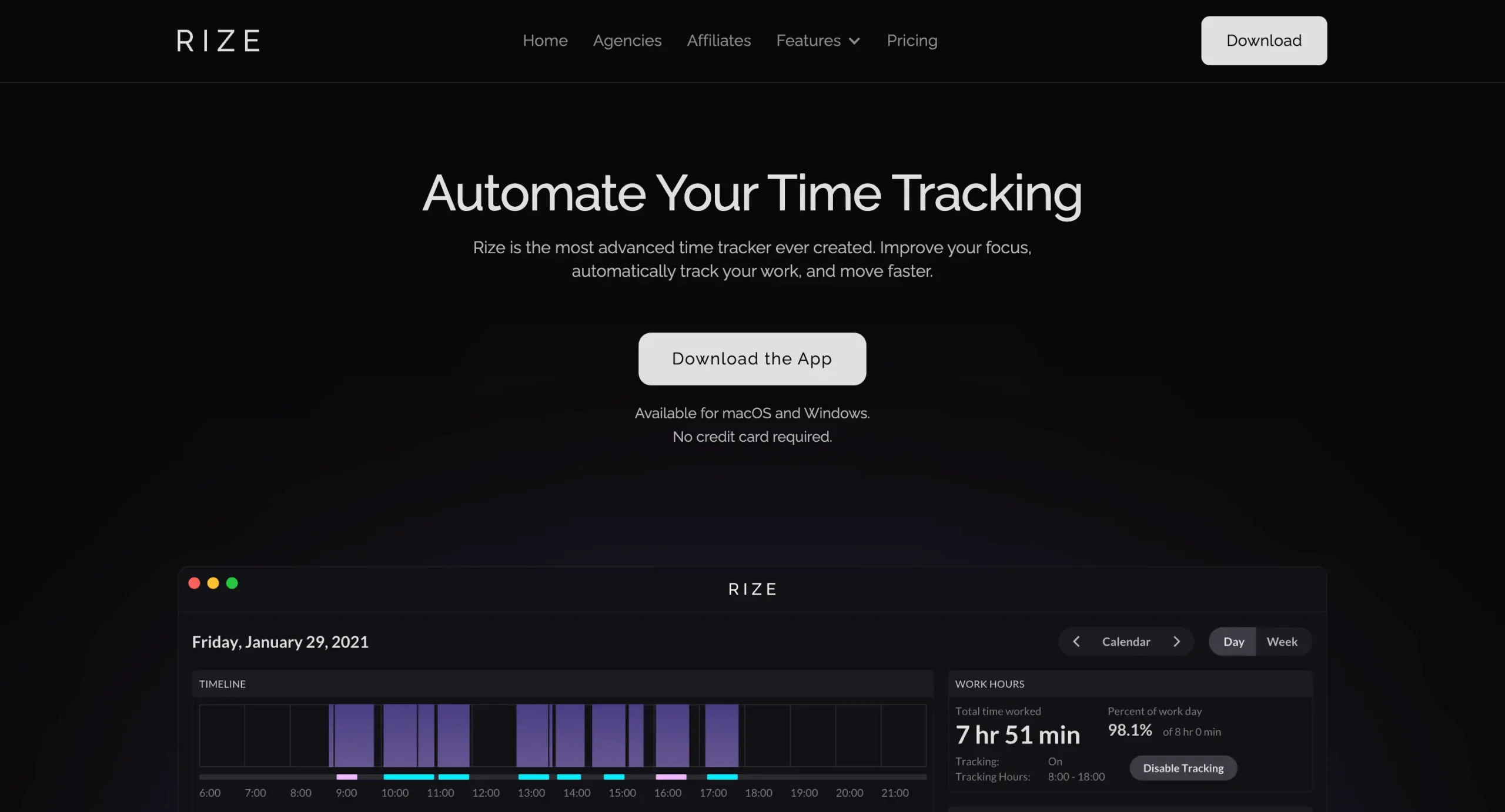
In the modern era of knowledge work, the currency of success is no longer just “hours spent at a desk” but rather the quality of attention applied to complex problems. For decades, freelancers, agencies, and remote workers have relied on manual time trackers—digital stopwatches that require the user to consciously toggle a button every time they switch tasks. This model, while functional for basic billing, is fundamentally broken for productivity. It relies on human memory, which is fallible, and human discipline, which is finite. Enter Rize io, a tool that promises to end the tyranny of the manual timer by offering a completely passive, intelligent, and memory-less system for tracking work. But Rize io is more than just a time logger; it is a philosophy of work that prioritizes “Deep Work”—a concept popularized by Cal Newport—over shallow busyness.
The core philosophy behind Rize io is that you cannot improve what you do not measure, but the act of measuring shouldn’t interfere with the work itself. Manual trackers like Toggl or Clockify introduce a “Heisenberg Uncertainty Principle” to productivity: by stopping to log your time, you interrupt the very flow state you are trying to measure. You break your concentration to tell a piece of software that you are concentrating. Rize io circumvents this paradox by operating in the background, observing your active window usage, and using machine learning to categorize that activity into meaningful buckets. It asks the user to trust an algorithm to understand their day, a shift that feels radical to control freaks but liberating to those suffering from “admin fatigue.”
Furthermore, Rize io addresses a critical gap in the market: the distinction between “working” and “focusing.” Most legacy time trackers treat all hours as equal. An hour spent replying to Slack messages is logged the same way as an hour spent coding a complex algorithm or writing a strategic brief. Rize io argues that these hours are not equal. One is shallow work, necessary but draining; the other is deep work, the high-leverage activity that drives careers forward. By introducing metrics like “Focus Quality,” Rize io attempts to quantify the intensity of your labor, not just the duration. This philosophical pivot moves the conversation from “How long did I work?” to “How well did I work?”
This shift is particularly relevant in the post-pandemic landscape. With the rise of hybrid models and the dissolution of the physical office, the boundaries between work and life have blurred. Without a commute to signal the start of the day or a boss walking by to ensure productivity, workers are left to self-regulate. Rize io steps in as a digital accountability partner. It is designed for the autonomous worker who needs objective data to defend their time against the onslaught of notifications, Zoom calls, and digital distractions. By automatically flagging overworking and suggesting breaks, Rize io also adopts a philosophy of sustainable productivity, positioning itself not as a slave-driver but as a guardrail against burnout.
The skepticism around tools like Rize io usually stems from a fear of surveillance. In an age where “bossware” is a growing concern, a tool that records every screen interaction can feel invasive. However, Rize io differentiates its philosophy by focusing on personal empowerment rather than employer oversight. The data is meant for the user, not the manager. This “quantified self” approach aligns Rize io more with health trackers like Oura or Whoop than with employee monitoring software like Hubstaff. It treats cognitive resources as a biological reality that must be managed, optimized, and protected.
Ultimately, the philosophy of Rize io is about closing the gap between intention and reality. We all intend to spend our mornings on high-priority projects, but the reality is often a fragmented mess of emails and quick checks on social media. Manual trackers only capture the intention (what you logged), but Rize io captures the reality (what you actually did). This brutal honesty is the necessary first step toward improvement. If the future of work is about autonomy and output, then the future of time tracking must be automated, intelligent, and insightful. Rize io is betting its existence on that future, aiming to make manual timers look as archaic as the punch cards of the industrial revolution.

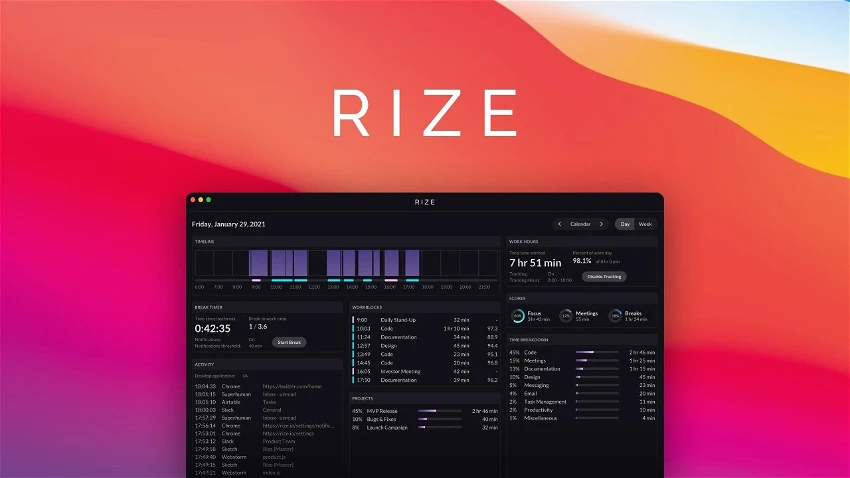
To understand why Rize io commands a premium price point in a market flooded with free alternatives, one must perform a deep dive into its feature set. It is not merely a logger; it is a productivity engine. The foundation of the system is its Automatic Time Tracking, but the real magic lies in how it processes and presents that data. Unlike competitors that simply list URLs visited, Rize io aggregates activity into customizable categories—Design, Development, Communication, Browsing—and then visualizes this data in a real-time timeline. This granularity allows users to see not just that they worked, but the rhythm of their work.
One of the standout features of Rize io is the Focus Quality Score. This is not a vanity metric; it is calculated based on a complex algorithm that considers dozens of factors. It looks at how often you context-switch (jump between apps), how much time you spend in “distracting” apps (which you define), and the length of your uninterrupted blocks. If you spend an hour writing a document but tab out to check Twitter every six minutes, Rize io will know. It will tank your Focus Quality Score for that session, providing immediate feedback that your “work” was actually fragmented and low-quality. This gamification of focus is incredibly effective for behavioral change. You find yourself resisting the urge to click a notification simply because you want to protect your score, effectively training your brain to sustain attention longer.
Another critical feature is the Session Timer. While Rize io is famous for automatic tracking, it acknowledges that sometimes you need to declare an intention. The Session Timer allows you to start a “Focus Block” similar to a Pomodoro timer. However, Rize io enhances this by tying it to the automatic tracking. If you start a 45-minute coding session but end up on YouTube, the session timer doesn’t just keep ticking blindly; the resulting report will show the discrepancy between your planned session and your actual activity. This feature effectively bridges the gap between the Pomodoro technique and automatic logging, offering the structure of the former with the accuracy of the latter.
Rize io also includes robust Break Notifications and Overworking Alerts. In the “hustle culture” of tech and freelance, it is easy to sit at a computer for four hours straight without moving. This is detrimental to long-term cognitive function. Rize io uses its activity data to prompt you to take breaks based on your actual activity. If you haven’t stopped typing or moving your mouse for a set period, a gentle notification appears, encouraging a reset. Unlike a dumb timer that rings every 25 minutes regardless of your flow state, Rize io can be configured to be smarter, though its default break reminders are a crucial health feature for remote workers prone to sedentary binges.
A newer addition to the Rize io ecosystem is the Project and Client Tracking (available on higher-tier plans). Historically, automatic trackers struggled with billing because they knew you were in “Adobe Photoshop” but didn’t know which client that work was for. Rize io solves this with rule-based tagging and manual overrides. You can set rules that say “Any time spent in this specific Figma file or this GitHub repository maps to Client A.” For general work, you can easily drag and drop blocks of time on your timeline to assign them to projects. This makes Rize io a viable tool for billable professionals who need to generate invoices but hate the start/stop mechanics of traditional billing software.
The Google Calendar and Outlook Integration further enriches the data. Rize io pulls in your meeting schedule and compares it against your activity. It can automatically categorize time during a scheduled Zoom call as “Meeting,” saving you from having to manually categorize that block. More importantly, it highlights “fragmented time”—those awkward 15-minute gaps between meetings where no real work gets done. By visualizing your calendar alongside your actual focus data, Rize io makes a compelling case for meeting batching and calendar blocking, showing you starkly how a poorly planned schedule destroys your ability to achieve a high Focus Quality Score.
Finally, the Distraction Blocker in Rize io deserves mention. While not as aggressive as a dedicated blocker like Freedom, it is integrated intelligently into the workflow. When you enter a Focus Session, Rize io can automatically overlay a “Are you sure?” screen if you try to visit a site labeled as distracting. It’s a gentle nudge rather than a hard wall, which aligns with the tool’s philosophy of building better habits through awareness rather than brute force restriction. All these features combine to make Rize io a comprehensive operating system for personal productivity, far surpassing the capabilities of a simple time sheet.

The user experience (UX) and user interface (UI) of Rize io are perhaps its strongest competitive advantages. In a software category defined by utilitarian, spreadsheet-like designs (looking at you, RescueTime Classic), Rize io feels like a modern, premium product designed for 2025. The interface is dark-mode centric, sleek, and minimalist, utilizing neon accents to denote different categories of work. It looks less like an accounting tool and more like a dashboard for a spaceship or a high-end gaming HUD. This aesthetic choice matters because if you are going to keep an app open on your second monitor all day, it needs to be visually pleasing.
Upon launching Rize io, the user is greeted by the Daily Timeline. This is the heartbeat of the application. It visualizes your day as a vertical stack of time blocks, similar to a calendar view but populated by actual activity. Gaps in work are shown as empty space, making it immediately obvious when you took a lunch break or stepped away. Each block is color-coded: blue for coding, purple for design, green for communication, red for browsing. This color-coded heatmap allows for instant comprehension of your day at a glance. You can see, without reading a single number, if your day was dominated by meetings or if you managed to secure that elusive “deep work” block in the morning.
The Desktop Widget is another triumph of UI design. Many time trackers have invasive floating windows that clutter the screen. Rize io offers a pill-shaped widget that can hover unobtrusively in the corner or stay pinned to the menu bar. This widget displays your current session duration, your current task (inferred or set), and a ring indicating your progress toward your daily focus goal. It acts as a subtle peripheral reminder to stay on task. When you switch context—say, from a Word document to Reddit—the widget updates instantly, and seeing that text change can often be enough of a psychological trigger to close the tab and go back to work.
Onboarding with Rize io is surprisingly smooth for such a complex tool. The “Cold Start” problem—where a tracking tool is useless until you’ve manually categorized thousands of websites—is mitigated by Rize io’s global database. Out of the box, it knows that VS Code is “Development,” Slack is “Communication,” and Instagram is “Social Media.” Of course, there are edge cases. Proprietary internal tools or obscure websites might show up as “Uncategorized,” but the UI for fixing this is intuitive. You simply right-click the block on the timeline and select “Always categorize [App Name] as [Category].” The system learns quickly. Within three days of use, most users find that Rize io accurately categorizes 95% of their activity without intervention.
The Report Dashboard is where the data comes to life. Rize io sends a daily email report that is beautiful enough to frame, but the in-app analytics are even better. You can toggle between Daily, Weekly, and Monthly views. The animations are smooth, and the data visualization is interactive. Hovering over a bar in the “Top Distractions” chart shows you exactly when those distractions occurred. The “Work Hours” chart helps you identify your natural circadian rhythm—users often discover they are night owls or early birds based on when their Focus Quality Score peaks. The UI presents this complex data in simple, digestible cards, avoiding the “data vomit” that plagues other analytics tools.
However, the UX is not without its learning curve. Because Rize io offers so much power—rules, exclusions, project tagging, schedule configuration—the settings menu can be dense. Configuring your “Work Schedule” (so the app doesn’t track you watching Netflix on Friday night) is crucial, but can be buried in the preferences. Furthermore, the sheer amount of information on the main dashboard can be overwhelming to a new user. There are numbers for “Focus Time,” “Meeting Time,” “Break Time,” “Work Hours,” and “Session Adherence.” It takes a week or two to understand which of these metrics actually matter to your personal workflow.
Despite these minor friction points, the Rize io interface sets the gold standard for the industry. It feels responsive, native (it’s a desktop app, not a web wrapper), and polished. The interactions—dragging a time block to resize it, right-clicking to split a session—feel tactile and precise. For a tool that demands to be running 24/7 on your machine, the high level of polish is necessary to earn the user’s trust and screen real estate. Rize io has proved that productivity tools don’t have to be ugly to be functional.
To evaluate Rize io, one must place it in the arena with its gladiators: RescueTime, Toggl Track, and the open-source contenders like ActivityWatch. Each of these tools serves a slightly different master, and Rize io has carved out a niche that overlaps with all of them while offering something distinct. The most direct comparison is RescueTime, the grandfather of automatic time tracking. For years, RescueTime was the default choice. However, in recent years, RescueTime’s “Classic” interface aged poorly, and their new version pivoted hard toward a simplified “assistant” model that removed much of the granular data power users loved.
Rize io vs. RescueTime is a battle of Granularity vs. Simplicity. RescueTime (the modern version) gives you a “Productivity Pulse” and broad categories. It is great for a general overview. Rize io, however, gives you the minute-by-minute timeline. If you want to know exactly what you were doing at 2:14 PM last Tuesday, Rize io can tell you; RescueTime often aggregates this away. Furthermore, Rize io’s “Focus Quality” metric is far more nuanced than RescueTime’s binary “Productive vs. Distracting” classification. Rize io also wins handily on UI/UX; it feels like a piece of modern software, whereas RescueTime can feel like a legacy web app. However, RescueTime is generally cheaper and has a mobile app (iOS/Android), which is Rize io’s Achilles’ heel (more on that later).
Rize io vs. Toggl Track represents the clash of philosophies: Automatic vs. Manual. Toggl is the king of manual timers. It is free, robust, and perfect for agencies that need to bill clients down to the second for specific tasks. If your workflow involves jumping between 10 different client projects every hour, and you need 100% accuracy for billing, Toggl is superior because you tell it what you are doing. Rize io tries to compete here with its project tagging, but automatic detection can struggle to differentiate “Client A Website Design” from “Client B Website Design” if you are using the same tool (Figma) for both. However, for personal productivity and understanding habits, Rize io destroys Toggl. Toggl only tells you what you remembered to track; Rize io tells you the truth, including the 2 hours you wasted on Reddit that you certainly didn’t log in Toggl.
Then there are the privacy-focused and open-source alternatives like ActivityWatch and Cronus. Users who are paranoid about sending data to the cloud often prefer ActivityWatch, which stores everything locally. Rize io is a cloud-connected app (though they emphasize strict privacy policies and data encryption). While Rize io offers a level of polish and AI insight that ActivityWatch cannot match (ActivityWatch’s UI is very basic and raw), the privacy trade-off is real. Cronus is a newer entrant positioning itself as a free, AI-powered alternative. While promising, these newer tools lack the maturity, stability, and depth of the Rize io ecosystem. Rize io sits in the “Prosumer” sweet spot: easier to use than open source, more powerful than RescueTime, and more automated than Toggl.
A major differentiator for Rize io is the “coaching” aspect. Competitors mostly just display data. Rize io actively intervenes. The break notifications, the overworking alerts, and the focus quality scoring create a feedback loop that the others lack. RescueTime tries this with its “Focus Sessions,” but Rize io feels more integrated into the OS workflow.
The pricing comparison is where Rize io faces its toughest critique. Toggl has a generous free tier. RescueTime is affordable. ActivityWatch is free. Rize io is expensive (starting around $10-$17/month depending on billing). It is positioning itself as a premium tool for high-earners—software engineers, consultants, executives—who value their time at hundreds of dollars an hour. For a student, Rize io is likely overpriced compared to Toggl. For a senior developer, reclaiming 3 hours of focus a week easily pays for the annual subscription. Rize io is not trying to be the cheapest; it is trying to be the best for a specific type of knowledge worker.
Owning a Ferrari doesn’t make you a race car driver, and installing Rize io doesn’t automatically make you productive. The tool provides the data, but the user must provide the strategy. To truly justify the cost of Rize io, one must integrate it into a deliberate productivity workflow. The most effective strategy is the “Review and Optimize” loop. This involves taking 10 minutes every Friday afternoon to review the Rize io Weekly Report.
During this review, look for “Red Flags” in the data. Are you spending 15 hours a week in “Communication” (Slack/Email)? If so, Rize io has given you the evidence you need to propose a change to your team, perhaps implementing “async hours” or checking email only twice a day. Look at your “Context Switching” metrics. If your switching is high, it means you are multitasking. Use this insight to enforce single-tasking during the next week. The power of Rize io is that it moves these discussions from “I feel like I’m busy” to “I have data showing I switched context 400 times yesterday.”
Another powerful workflow is “Gamifying the Focus Score.” Set a goal in Rize io to hit a Focus Quality Score of 80+ for at least 3 hours a day. This creates a subconscious barrier to distraction. When you feel the urge to check the news, you’ll hesitate because you don’t want to ruin your streak. This external motivation is surprisingly effective. Pair this with the Session Timer. When you have a hard task—writing a report or debugging code—manually start a 60-minute Focus Session in Rize io with the “Distraction Blocker” enabled. This creates a “digital tunnel” where your only option is to work.
Rize io also excels at “Energy Management.” Analyze your “Work Hours” heat map. Most people have a peak energy window—often 9 AM to 11 AM, or perhaps late at night. Rize io will clearly show when your focus is naturally highest. The strategy here is to aggressively protect these hours. Block them out on your Google Calendar (which syncs to Rize io) as “Deep Work.” Do not schedule meetings during these green zones. Save your low-energy tasks (admin, email, calls) for the times when Rize io shows your focus naturally dips, usually mid-afternoon. This aligns your work with your biology, maximizing output per hour.
Integrating Rize io with your physical environment enhances its utility. When Rize io triggers a “Take a Break” notification, actually stand up. The app uses the Pomodoro concept but makes it flexible. If you are in a flow state, you can snooze the break. But generally, adhering to these nudges prevents the “3 PM Crash.” Users who obey the break prompts often report having more energy at 6 PM than those who power through.
For freelancers and agencies, the “Project Tagging” workflow is essential. At the end of every day, spend 5 minutes reviewing your timeline in Rize io. Bulk-select your blocks and assign them to clients. This ensures that when invoice day comes, you have a precise, defensible record of work. You can even export these reports to PDF to send to clients, adding a layer of professionalism and transparency that manual timesheets lack. By combining the automatic tracking with a daily 5-minute “cleanup,” you get the billing accuracy of Toggl with the passivity of Rize io.
Finally, customize the “Categories.” Don’t stick to the defaults. If “Learning” is important to you, create a category for it and assign your reading apps or course platforms to it. If “Networking” is a KPI, create a category for LinkedIn and Zoom. Rize io becomes a mirror of your priorities. If you say networking is a priority but your Rize io stats show 2% of time spent there, you have a discrepancy to fix. Use Rize io as the ultimate truth-teller in your professional life.
After dissecting the philosophy, features, interface, competition, and strategies, we arrive at the final verdict on Rize io. Is it worth the subscription? The answer depends entirely on how you value your time and your data. Rize io operates on a subscription model, typically pricing its Standard plan around $12.99 to $16.99 per month (depending on annual vs. monthly billing), with a Professional tier pushing higher for advanced client features. For a “to-do list” app, this would be exorbitant. But Rize io is not a utility; it is a force multiplier.
– You are a casual user: If you just want to know roughly how much time you spend on the computer, the free version of RescueTime or the screen time built into macOS/Windows is sufficient.
– You work primarily on mobile: This is the single biggest flaw of Rize io. It is a desktop-first (and currently desktop-only) tool. If your work involves heavy phone calls, driving, or mobile app usage, Rize io will miss 50% of your day. While you can manually add time blocks, it defeats the “automatic” purpose.
– You are on a tight budget: There are free alternatives. If $150/year feels like a significant expense for software, the marginal gains from Rize io might not justify the cost over a free tool like Toggl.
– You have strict employer spyware: If your company already installs monitoring software, installing Rize io might be redundant or technically conflicted.
– You are a Knowledge Worker/Freelancer: If you bill by the hour or if your output is directly tied to your mental focus (coders, writers, designers), Rize io pays for itself in one day. Recovering just 20 minutes of billable time a month covers the subscription.
– You struggle with Context Switching: If you end your days feeling exhausted but accomplishing nothing, the “Focus Quality” insights are invaluable therapy. Rize io makes the invisible visible, allowing you to diagnose and cure your fragmentation.
– You love data and UI: If you appreciate premium software and find motivation in beautiful charts and graphs, Rize io is a joy to use. It reduces the friction of tracking to zero, which means you will actually stick with it long-term.
– You want to protect your health: The break reminders and overworking alerts are genuine health features. For remote workers without external boundaries, Rize io acts as the guardrail that prevents burnout.
In conclusion, Rize io represents the maturation of time tracking. It moves the industry away from the reactive “punching the clock” mentality toward a proactive “optimizing the mind” approach. It is currently the best-in-class tool for automatic time tracking, unrivaled in its UI and the depth of its focus metrics. While the lack of a mobile app and the premium price tag are valid hurdles, for the serious professional committed to Deep Work, Rize io is not just a purchase; it is an investment in one’s career capital. It truly signals the end of manual time tracking for the desktop era, proving that with the right AI, we can stop counting the hours and start making the hours count.
